For Apple Watch
An Apple Watch time tracker
The hours you lose are usually the ones you meant to write down later. Tracking from your wrist closes the gap between finishing the work and recording it.
Most time goes missing in the space between doing the work and writing it down. You finish a call, move straight to the next thing, and tell yourself you will log it later. By the end of the day the edges have blurred, so you round down and give away the difference. Your wrist is the shortest path from finishing a task to recording it, because your watch is already there. There is no app to find and no laptop to open.
What tracking on the wrist needs
A watch is a small screen you look at for a second or two. A time tracker that lives there has to respect that.
- A glanceable day. One look should tell you how much you have logged so far, without scrolling or tapping through screens.
- Logging in a tap or two. If recording a block takes real effort, you will skip it on the busy days that matter most.
- Sync you can trust. What you log on your wrist has to be waiting on your phone and Mac, automatically, without a thought.
How Clocktower works on Apple Watch
Clocktower has a native Apple Watch app. Raise your wrist and a segmented eight-hour gauge shows the day's total at a glance, filling as you log. To record time, you turn the Digital Crown to set the hours and tap the project it belongs to. That is the whole interaction.
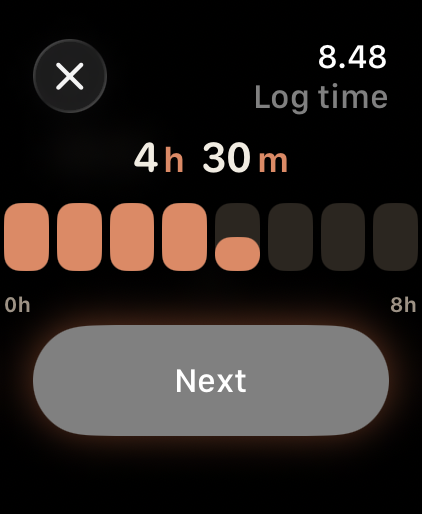
The Watch app is a companion to Clocktower on iPhone, iPad, and Mac. Your projects come from there, and everything you log on your wrist syncs back over your private iCloud. There is no separate account and no extra setup. Log on the watch, and the hours are already on your phone when you check.
Clocktower is a visual time tracker for people who bill by the hour. Log your day in a swipe on iPhone, iPad, and Mac, glance and log from your wrist on Apple Watch, and turn the week into a clean, billable timesheet.